Reproduceable Workflows
RStudio, PBC
Data Science Workflow

Develop -> Share -> Productionize
“Illustration from Hadley Wickham’s talk”The Joy of Functional Programming (for Data Science).” by Allison Horst
New tools and tricks: Development

tidymodels - The tidymodels framework is a collection of packages for modeling and machine learning using tidyverse principles.

vetiver - Vetiver provides fluent tooling to version, deploy, and monitor a trained model.

pins - The pins package publishes data, models, and other R objects, making it easy to share them across projects and with your colleagues.

plumber APIs - Plumber allows you to create a web API by merely decorating your existing R source code with roxygen2-like comments.
tidymodels https://www.tidymodels.org/, vetiver https://vetiver.rstudio.com/, pins https://pins.rstudio.com/, plumber https://www.rplumber.io/
New tools and tricks: Sharing

quarto - A new open-source scientific and technical publishing system that works with R, Python, Julia, Javascript, and many other languages.

shinyuieditor - A visual tool for building the UI portion of a Shiny application that generates clean and human-readable code.

flexdashboard - Flexible and easy to specify row and column-based layouts. Components are intelligently re-sized to fill the browser and adapted for display on mobile devices.

rstudio/posit connect - Hosting for analytics, dashboards, API’s, pinned datasets while working in an enterprise environment.
quarto https://quarto.org/, shinyuieditor https://rstudio.github.io/shinyuieditor/, flexdashboard https://pkgs.rstudio.com/flexdashboard/, Connect https://www.rstudio.com/products/connect/
New tools and tricks: Productionize

Version control - GitHub, Inc. is an Internet hosting service for software development and version control using Git. Other options include Bitbucket, Gitlab, and Azure DevOps.
renv - renv helps manage library paths (and other project-specific state) to help isolate your project’s dependencies.
rstudio/posit package manager - In addition to providing standard mirrors of CRAN, Bioconductor, and PyPI, you can track changes over time or freeze packages to specific versions, to help ensure reproducibility and ease collaboration.
git https://git-scm.com/, renv https://rstudio.github.io/renv, Package Manager https://rstudio.com/products/package-manager/ and Public Package Manager https://packagemanager.rstudio.com/
Environment Management Strategies
Great data science work should be reproducible and collaborative.
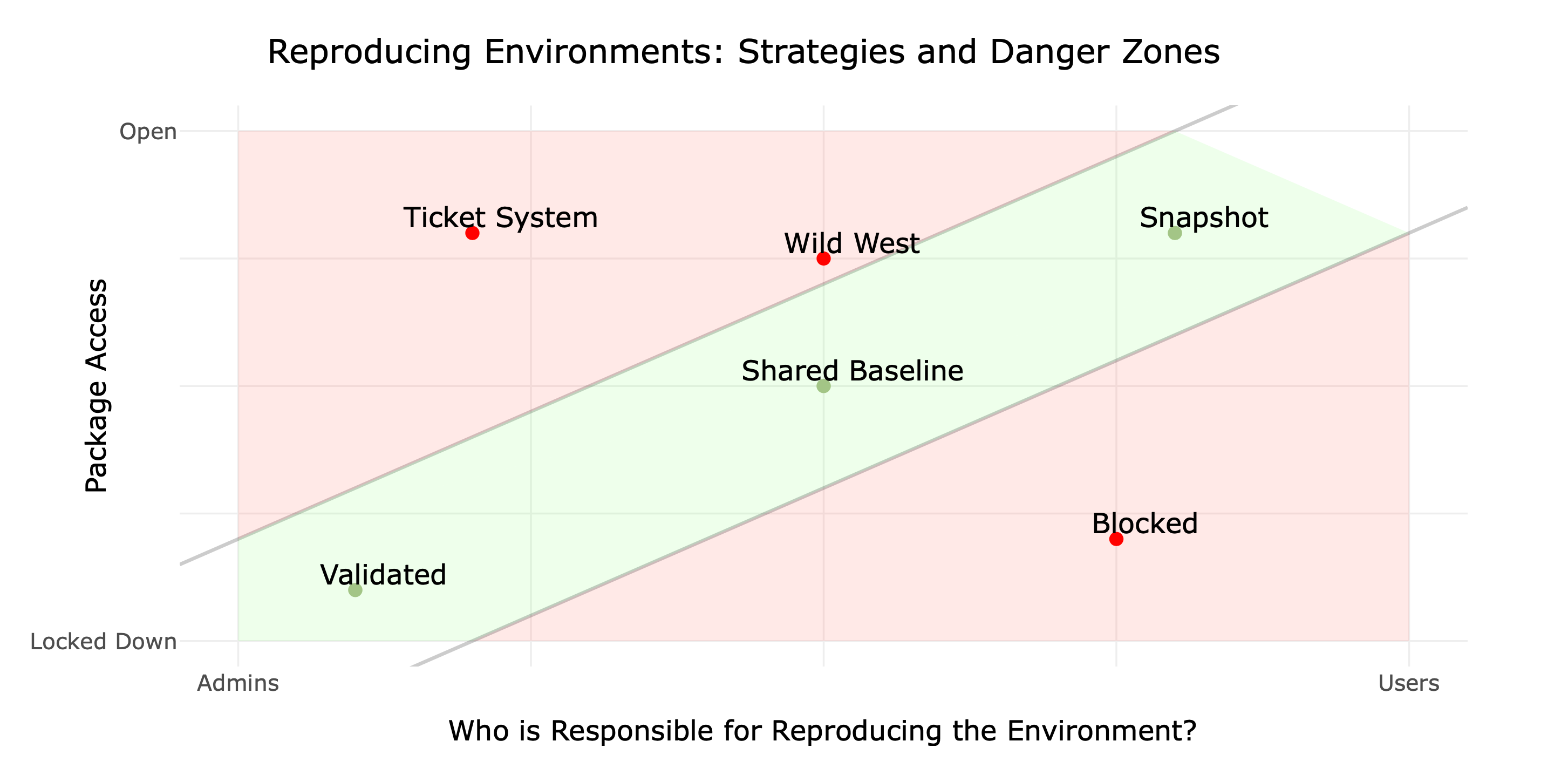
Environments Strategy Maps https://solutions.rstudio.com/environments/reproduce/
Case Study

Bike Predict https://solutions.rstudio.com/example/bike_predict/
Where to go from here
What They Forgot to Teach You About R : https://rstats.wtf/
Happy Git with R : https://happygitwithr.com/
Get started with renv in the RStudio IDE: https://docs.posit.co/ide/user/ide/guide/environments/r/renv.html
Vetiver
- Vetiver blog announcement post, https://www.rstudio.com/blog/announce-vetiver/
- Vetiver tidyverse announcement post, https://www.tidyverse.org/blog/2022/06/announce-vetiver/
Using Public Package Manager : https://support.rstudio.com/hc/en-us/articles/360046703913-FAQ-for-RStudio-Public-Package-Manager
Interested in our Enterprise Products? Click here
